Though we refer to them as "permissions" in this document, this concept is interchangeable with that of OAuth scopes. If you're unfamiliar with scopes, see oauth.com's article as a starting point.
When you create a new developer application, you must select the permissions required by your application. You should choose the smallest set necessary for your application to function properly – for example, if you are writing an application which creates Inbox Leads, you may not need access to records like Matters.
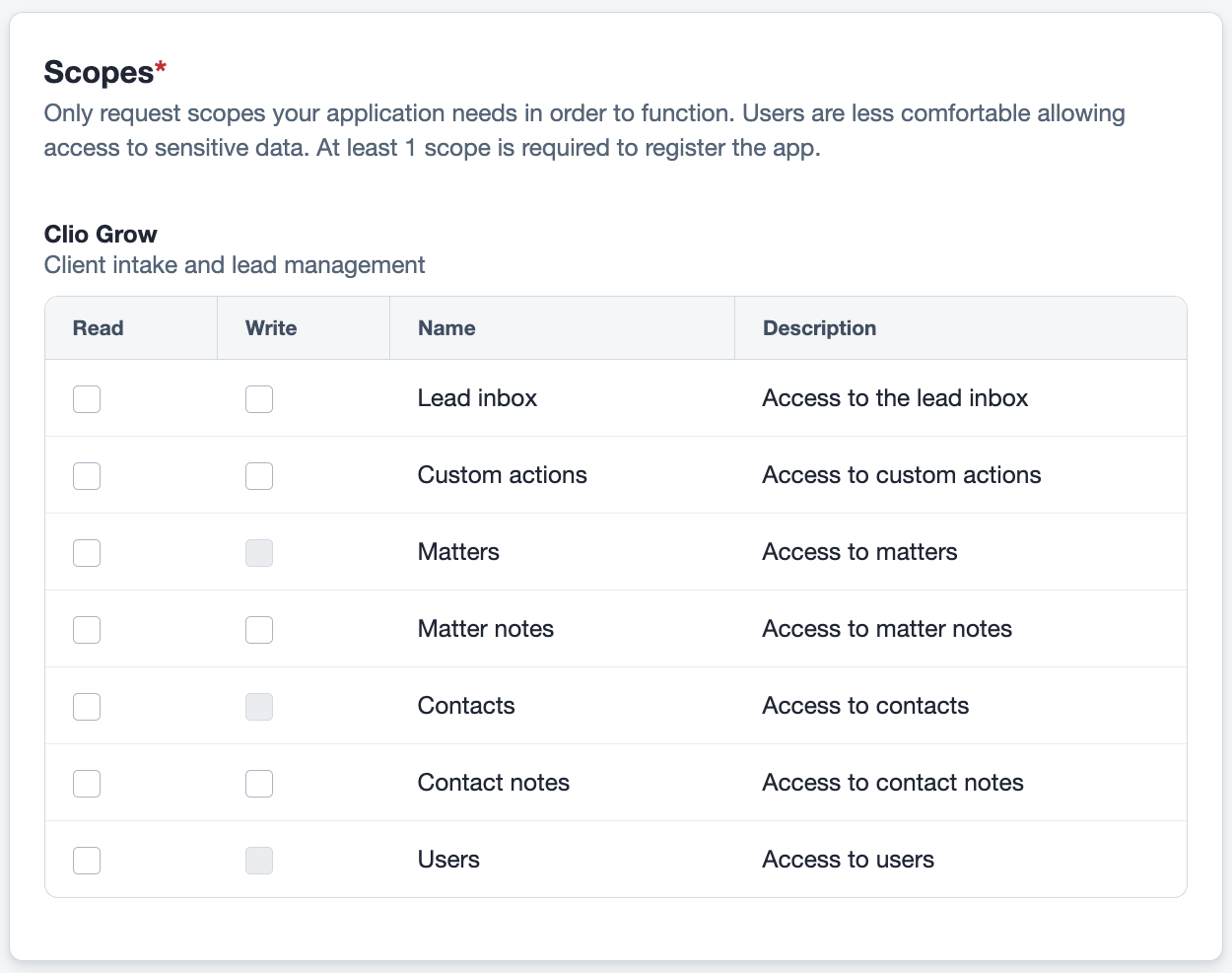
Permissions are divided into read and write options. Read access allows you to read records for that resource by making GET requests, while write access allows you to create, update, and/or delete records for that resource via POST, PATCH, and DELETE requests. Note that not all endpoints support all methods; see the API reference for more information on each endpoint's supported methods.
For example, read access to Matters allows you to perform GET requests to retrieve matters, whether to get a list of matters or get detailed information about a specific matter. Write access to Matter Notes allows you to create, update, or delete matter notes via POST, PATCH, and DELETE requests.
During the first step of OAuth authorization, you must include the scopes your application is requesting as a query parameter. If you request a scope that is not included in your application's settings, the user will not be able to authorize your application. When a user enters the authorization flow, they are presented with the list of permissions that your app has requested, which they must accept before an authorization code is generated and sent to your app.
Available Scopes
The following scopes are available for use with the Clio Platform API:
| Scope | Description |
|---|---|
grow_lead_inbox_write | Write Inbox Leads |
grow_lead_inbox_read | Read Inbox Leads (leads your application submitted) |
grow_lead_inbox_all_read | Read Inbox Leads, including leads submitted by other applications |
grow_custom_action_write | Write Custom Actions |
grow_custom_action_read | Read Custom Actions |
grow_custom_field_read | Read custom field values on Contacts and Matters |
grow_matter_read | Read Matters |
grow_matter_note_write | Write Matter Notes |
grow_matter_note_read | Read Matter Notes |
grow_matter_type_write | Write Matter Types |
grow_matter_type_read | Read Matter Types |
grow_location_write | Write Locations |
grow_location_read | Read Locations |
grow_marketing_campaign_read | Read Marketing Campaigns |
grow_contact_read | Read Contacts |
grow_contact_note_write | Write Contact Notes |
grow_contact_note_read | Read Contact Notes |
grow_user_read | Read Users |
Scopes by Endpoint
Each Clio Grow API endpoint requires the scope listed below. Where a row lists two scopes joined by "or", either one is enough. See the Clio Grow API reference for each endpoint's parameters and responses.
| Method | Endpoint | Required scope |
|---|---|---|
POST | /inbox_leads | grow_lead_inbox_write |
GET | /inbox_leads | grow_lead_inbox_read or grow_lead_inbox_all_read |
GET | /inbox_leads/{id} | grow_lead_inbox_read or grow_lead_inbox_all_read |
GET | /sources | grow_lead_inbox_read or grow_lead_inbox_all_read |
POST | /sources | grow_lead_inbox_write |
GET | /marketing_campaigns | grow_marketing_campaign_read |
GET | /marketing_campaigns/{id} | grow_marketing_campaign_read |
GET | /custom_actions | grow_custom_action_read |
POST | /custom_actions | grow_custom_action_write |
DELETE | /custom_actions/{id} | grow_custom_action_write |
GET | /contacts | grow_contact_read |
GET | /contacts/{id} | grow_contact_read |
GET | /contacts/{contact_id}/notes | grow_contact_note_read |
POST | /contacts/{contact_id}/notes | grow_contact_note_write |
GET | /matters | grow_matter_read |
GET | /matters/{id} | grow_matter_read |
GET | /matters/{matter_id}/notes | grow_matter_note_read |
POST | /matters/{matter_id}/notes | grow_matter_note_write |
GET | /matter_types | grow_matter_type_read |
GET | /matter_types/{id} | grow_matter_type_read |
POST | /matter_types | grow_matter_type_write |
GET | /locations | grow_location_read |
GET | /locations/{id} | grow_location_read |
POST | /locations | grow_location_write |
GET | /users | grow_user_read |
GET | /users/who_am_i | grow_user_read |
- Inbox Leads: with
grow_lead_inbox_read, the Inbox Leads read endpoints return only the leads your application submitted. Withgrow_lead_inbox_all_read, they return every inbox lead on the account, including leads submitted by other applications. - Creating Inbox Leads:
POST /inbox_leadsneeds onlygrow_lead_inbox_write, also when the lead references a matter type, location, marketing source, or marketing campaign. You do not need the read scopes for those resources. - Custom field values:
grow_custom_field_readhas no endpoint of its own. It controls thecustom_field_valuesarray thatGET /contacts,GET /contacts/{id},GET /matters, andGET /matters/{id}return when you passinclude=custom_field_values. Without this scope the request still succeeds with a200: the array isnull, andcustom_field_valuesis listed in the record'sredacted_fields.
Changing Permissions
You may change your application's permissions at any time. However, once a user has authorized your application, their permissions are fixed, even if their token is refreshed. If you change permissions in your application settings, you'll need to prompt your users to reauthorize your application to generate new access and refresh tokens that will allow your app to access to the newly requested scopes.
I have a valid token but I'm getting a 403 Forbidden — why?
A 403 Forbidden with "type": "ForbiddenError" means the request was authenticated but not authorized. The most likely cause is that your application did not request the scope needed for this endpoint, or the user authorized your app before you added the scope.
Fix: add the required scope in your app settings in the developer portal, then prompt affected users to reauthorize. See Available Scopes for the full list, and Scopes by Endpoint for the scope each endpoint requires.
If you received a 403 with a body like "explicit deny in an identity-based policy", that is a different error — see Authorization troubleshooting.
Missing Permissions
If you try to access an endpoint without the necessary permissions, The API will return a 403 Forbidden response. The body of the response will contain an error object with some information about the error, like so:
{ "error": { "type": "ForbiddenError", "message": "User is forbidden from taking that action" }}Source: https://docs.developers.clio.com/api-docs/clio-platform/permissions/